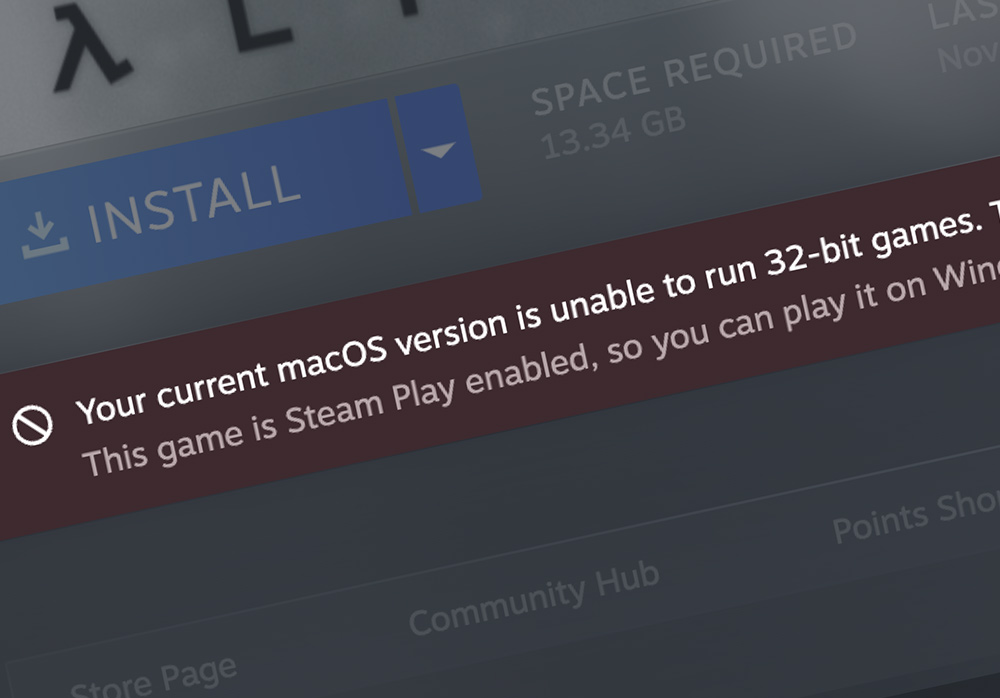
What Happened to All Those Steam Games?
If you've been gaming on a Mac for a while, you may have noticed that a bunch of games in your Steam library are grayed out or just won't launch anymore. Games like Counter-Strike: Source, Half-Life 2, Left 4 Dead, Portal, and Team Fortress 2 (the original Mac builds) all stopped working at some point.
The reason? These games are 32-bit applications, and Apple removed 32-bit support from macOS starting with Catalina in 2019. But what does that actually mean?
32-Bit vs. 64-Bit: The Simple Explanation
Think of it like this: every app on your computer speaks a language that your processor understands. For a long time, there were two "dialects" — 32-bit and 64-bit. The 64-bit dialect is newer and can handle more memory and do more things at once, but the older 32-bit dialect worked perfectly fine for most tasks.
For years, macOS was bilingual — it understood both dialects. Your Mac could run old 32-bit apps alongside new 64-bit ones without any issues. But in 2019, Apple decided to simplify and only support the newer 64-bit dialect. It was like a country deciding to only recognize one official language. Anything written in the old dialect simply stopped working overnight.
The problem is that many game developers — including Valve — never translated their older Mac games into the new 64-bit dialect. The Windows versions of these same games kept working fine because Windows still supports both. But on Mac, they became unplayable.
Which Games Are Affected?
This isn't a niche issue. Thousands of games on Steam have 32-bit-only Mac builds that no longer work. Some of the biggest names include:
| Game | Developer | Status on Modern macOS |
|---|---|---|
| Counter-Strike: Source | Valve | Won't launch (32-bit only) |
| Counter-Strike: Global Offensive | Valve | Mac support removed entirely |
| Half-Life 2 | Valve | Won't launch (32-bit only) |
| Half-Life 2: Episode One & Two | Valve | Won't launch (32-bit only) |
| Left 4 Dead | Valve | Won't launch (32-bit only) |
| Left 4 Dead 2 | Valve | Won't launch (32-bit only) |
| Portal | Valve | Won't launch (32-bit only) |
| Team Fortress 2 | Valve | Mac support removed |
| Garry's Mod | Facepunch Studios | Won't launch (32-bit only) |
| Civilization V | Firaxis / Aspyr | Won't launch (32-bit only) |
| Borderlands 2 | Gearbox / Aspyr | Won't launch (32-bit only) |
| BioShock Infinite | Irrational / Aspyr | Won't launch (32-bit only) |
This is a fraction of the full list. Steam's own store pages sometimes still show "macOS" support for these titles, even though they won't actually run on any Mac sold in the last several years. It's a frustrating experience for anyone who bought these games expecting them to just work.
The Fix: Run the Windows Version Instead
Here's the key insight: the Windows versions of these games still work perfectly fine. Windows never dropped 32-bit support the way Apple did. So the solution isn't to somehow make the broken Mac version work — it's to run the Windows version of the game on your Mac instead.
That's exactly what compatibility tools like CrossOver do. CrossOver creates a miniature Windows-like environment on your Mac — without needing an actual Windows license or a virtual machine. It translates Windows instructions into something macOS can understand in real time. And crucially, this environment has full 32-bit support, regardless of what macOS itself supports.
The result? You install the Windows version of Counter-Strike, Half-Life, or whatever else through CrossOver, and it just runs. Often better than the old Mac version ever did.
How to Set It Up with CrossOver
CrossOver is the easiest way to get this done. It's a commercial app from CodeWeavers that wraps the open-source Wine compatibility layer in a polished, user-friendly package. No command line, no config files — just install and go.
Step 1: Get CrossOver
Purchase CrossOver or grab the 14-day free trial to test things before you buy. The trial is fully functional — no features locked away.
Step 2: Install Steam
Open CrossOver and click "Install a Windows Application." Search for Steam — it's one of the most popular installs and CrossOver has it pre-configured. Click Install and let it do its thing. CrossOver will create a "bottle" (its term for an isolated Windows environment) with everything Steam needs.
Step 3: Install Your Games
Launch Steam inside CrossOver, log into your account, and install your games from your library. The key difference: Steam will show you the Windows versions of your games, not the broken Mac versions. Install them normally.
Step 4: Play
Launch the game from Steam inside CrossOver. That's it. For most Source engine games (Counter-Strike, Half-Life 2, Portal, Left 4 Dead), performance through CrossOver is excellent — these are older games that don't push modern hardware, so even a base-model Mac should handle them without issues.
Tip: Check the Compatibility Database
CrossOver maintains a compatibility database where users report how well specific games work. Before installing a game, search for it there — you'll find user ratings, tips, and any workarounds needed.
What About Performance?
For the 32-bit games we're talking about here, performance is usually a non-issue. These are older titles with modest system requirements. A few things to keep in mind:
- Source engine games (Counter-Strike: Source, Half-Life 2, Portal, Left 4 Dead) — Run very well through CrossOver. These games were never graphically demanding, and modern Macs handle them easily.
- Strategy games (Civilization V, etc.) — Work well. Turn-based and slower-paced games are ideal for compatibility layers since frame rates aren't as critical.
- Apple Silicon Macs — CrossOver runs Windows x86 code through Rosetta 2 translation on Apple Silicon. For these older games, the extra translation step is negligible — you won't notice it.
- Intel Macs — If you're still on an Intel Mac running a recent macOS, CrossOver works natively without any translation overhead.
In many cases, the Windows version running through CrossOver actually performs better than the old native Mac build ever did, since the original Mac ports were often poorly optimized.
Free Alternatives (For Tinkerers)
CrossOver is the easiest path, but it's not the only one. If you enjoy getting your hands dirty with technical projects, there are free Wine-based tools that can do the same thing. Fair warning: these require more patience and comfort with troubleshooting.
Sikarugir (Free, Open Source)
Sikarugir (formerly Kegworks/Wineskin) lets you wrap Windows apps into standalone macOS app bundles using Wine. You can install Steam through Sikarugir and then install your 32-bit games the same way you would in CrossOver. The main difference is that you'll need to manually select the right Wine engine, configure settings yourself, and troubleshoot any issues without the guided experience CrossOver provides.
It's a great option if you enjoy tinkering with settings and don't mind consulting forums when something doesn't work on the first try.
Heroic Games Launcher (Free, Open Source)
Heroic is primarily an alternative launcher for Epic Games Store and GOG, but it uses Wine under the hood and can run 32-bit Windows games on Mac. It's more focused on non-Steam stores, but worth mentioning if your 32-bit games live outside of Steam.
Mythic (Free, Open Source)
Mythic is a newer macOS-native game launcher that uses Apple's Game Porting Toolkit and Wine to run Windows games. It's still maturing, but it's another free option for the adventurous. Support for older 32-bit titles can be hit-or-miss depending on the Wine version it bundles.
The Tradeoff
Free tools give you flexibility and zero cost, but they come with a steeper learning curve. You might spend an afternoon configuring the right Wine prefix, tracking down missing DLLs, or figuring out why audio isn't working. For some people, that troubleshooting is the fun part. For everyone else, CrossOver saves hours of headaches and just works out of the box.
Why Didn't Valve Just Update Their Games?
This is the question every Mac gamer has asked. Valve had years of warning — Apple announced the 32-bit deprecation in 2018 and pulled the plug in 2019. Yet Valve never shipped 64-bit Mac builds for most of their catalog.
The likely reason is simple economics. Valve's focus shifted to Linux and the Steam Deck, where Proton (their compatibility layer, also built on Wine) handles everything. Maintaining native Mac ports for aging titles just wasn't a priority when their user data showed a tiny Mac player base for these games.
The irony? The same Wine technology that powers Valve's Proton on Linux is what powers CrossOver on Mac. The Windows versions of Valve's games work great through CrossOver for exactly this reason — Wine compatibility with Source engine games is rock-solid after years of optimization on the Linux side.
What About Games That Were Never on Mac?
While you're at it, CrossOver doesn't just solve the 32-bit problem. It also opens up the entire Windows games catalog — including games that never had Mac versions at all. If there's a Windows-only game you've been wanting to try, it's worth checking the CrossOver compatibility database to see if it works.
For bigger, more demanding titles, check out our article on CrossOver 26's anti-cheat breakthrough — modern AAA games like Helldivers 2 and Starfield now work on Mac too.
The Bottom Line
Apple's decision to drop 32-bit support left a lot of great games stranded. Valve and other developers never updated their Mac builds, and probably never will. But the games themselves aren't gone — the Windows versions work perfectly fine, and tools like CrossOver make it easy to run them on your Mac.
If you want it to just work, grab CrossOver (or try the free 14-day trial). If you like tinkering, give Sikarugir or one of the other free Wine tools a shot. Either way, your old favorites aren't lost — they just need a different path to get running.